
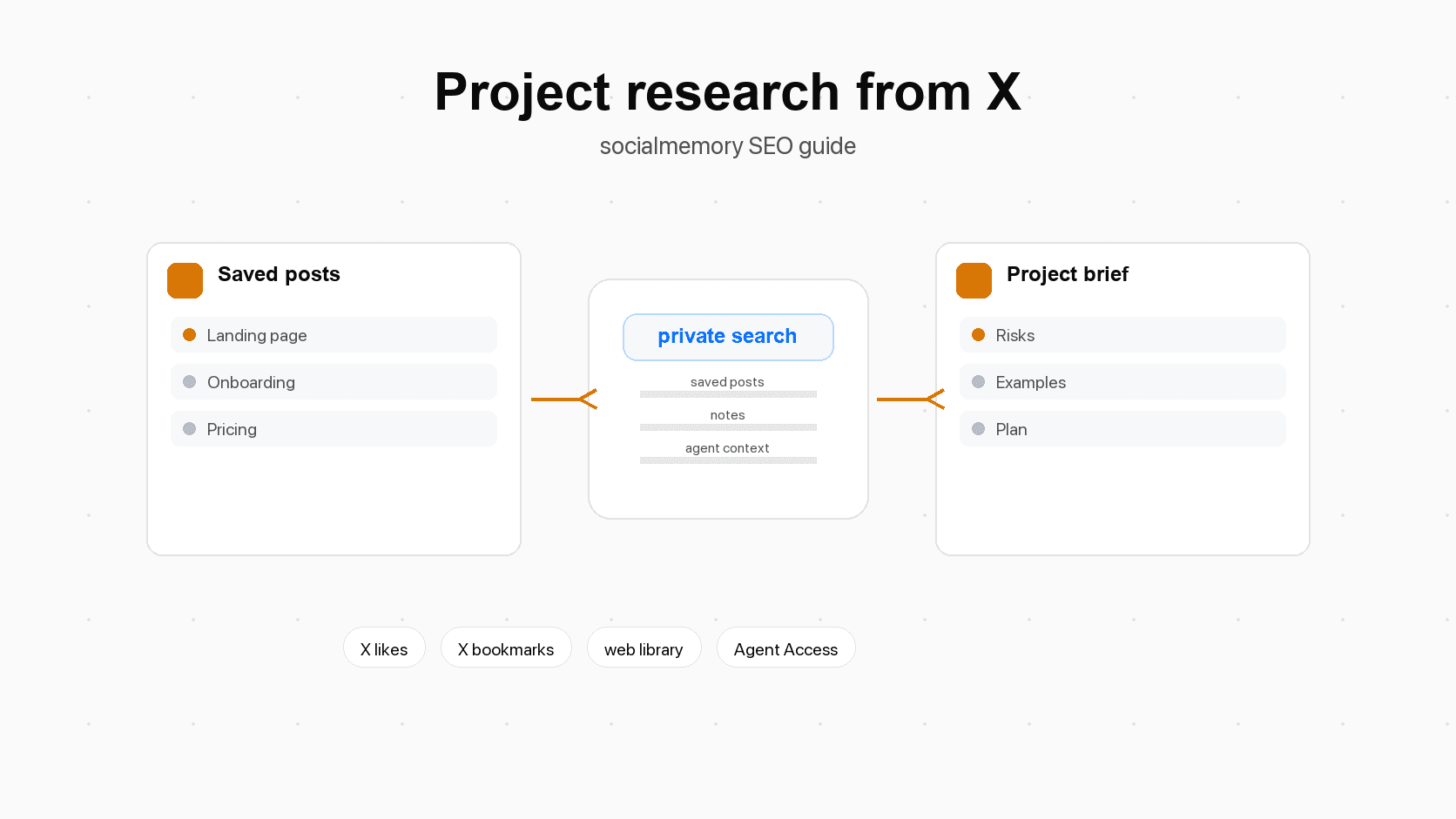
Why saved X posts are useful at project kickoff
Starting a new project usually begins with a familiar feeling: you know you saw a useful example, thread, launch, library, pricing page, or warning somewhere, but you cannot remember the exact wording or author. X is often where builders collect those fragments. You might save a post because the landing page was sharp, the onboarding lesson was painful, the code snippet looked useful, or the founder explained a pricing mistake you do not want to repeat.
Those saved posts become especially useful at the beginning of a project because early choices are cheap to change. Before you commit to a positioning angle, user flow, data model, extension permission, open-source license, launch plan, or design direction, you can still use outside examples to sharpen the project.
Saved posts are not proof, but they are signal
A saved X post is not the same as a research paper, customer interview, analytics report, or official document. Treat it as signal, not proof. Signal means it points you toward something worth checking. In context, your saved posts can reveal patterns like:
- You keep saving the same kind of onboarding example.
- You liked several warnings about AI product trust and latency.
- You bookmarked pricing posts about usage-based plans.
- You saved multiple open-source repos in the same category.
- You repeatedly reacted to launch posts with clear positioning.
That pattern is the useful part. One post may be random. Ten saved posts around the same project area are a map of what your past self already thought might matter.
Use them before decisions get expensive
Saved-post research is most useful before the work hardens. Search before you:
- write the first spec
- choose a feature scope
- design a landing page
- change onboarding
- set pricing assumptions
- pick a Chrome extension permission model
- publish a README
- create a launch plan
- ask a coding agent to edit files
This is not about procrastinating with research. It is a short project-start ritual. The goal is to reduce avoidable mistakes and give yourself better raw material.
The 15-minute saved-post research ritual
Use a timer. The ritual should be short enough that you actually do it before every meaningful project, but structured enough that the output is useful.
- Name the project in one sentence. Example: "Redesign the onboarding flow for a saved-X search product."
- Search your saved posts for the direct project words. Example: onboarding, activation, empty state, setup, Chrome extension.
- Search adjacent words. Example: first run, aha moment, permission, trial, trust, agent memory.
- Pull the best 5 to 15 results. Do not collect everything. Pick posts that change what you would do.
- Group the posts into lanes: examples, warnings, tools, copy, design, code, open questions.
- Write a brief. Keep it to one page if possible.
- Give the brief to your agent, teammate, or future self before implementation starts.
What to search first
Start with the obvious words, then widen. If the project is a landing page, do not only search landing page. Search hero, positioning, above the fold, pricing, proof, demo, testimonial, headline, and conversion. If the project is an AI feature, search agent, memory, context, evals, latency, trust, cost, prompt, and human in the loop.
The point is to search the language people used in the saved posts, not only the label you use today. Your older saved posts may use "Twitter" instead of "X", "LLM" instead of "AI agent", or "activation" instead of "onboarding".
What to pull into the brief
Do not paste a long pile of links. A project brief should make decisions easier. For each useful post, capture:
- the link
- the author, if that matters
- why you saved it
- what principle or warning it suggests
- whether it is an example, opinion, tool, code snippet, metric, or launch note
- one action it changes for this project
That last line is the filter. If a saved post does not change the project, it probably does not belong in the brief.
Build a project research brief from saved X posts
A good brief is not a summary of the internet. It is a working document for this project. It should be short, decision-focused, and easy to hand to an agent.
| Brief section | What to include | Example output |
|---|---|---|
| Project sentence | One plain sentence describing the project | "Build a project kickoff article that teaches people to search saved X posts first." |
| Best saved posts | 5 to 15 links with one-line notes | "Pricing thread: argues for value metric before tiers." |
| Patterns | Repeated themes across saved posts | "People react well to concrete before/after examples." |
| Examples to reuse | Screens, copy, flows, repos, prompts, or launch assets | "Use a three-lane brief: examples, warnings, decisions." |
| Warnings | Mistakes, risks, or constraints | "Do not ask for broad extension permissions before trust is clear." |
| Open questions | Things the posts did not answer | "Which pricing objection appears most often in our user calls?" |
| Next actions | What to do in the next work session | "Draft hero copy, then test against saved landing page examples." |
The brief format
Use this structure:
Project:

Goal:

Saved-post searches run:

Best posts:
1. [link] - why it matters - action it changes
2. [link] - why it matters - action it changes

Patterns:

Warnings:

Examples worth copying:

Questions before implementation:

Recommended first move:
The exact format matters less than the behavior: turn saved posts into decisions. A brief that says "I found 12 interesting posts" is weak. A brief that says "these three saved examples imply the onboarding should ask for Chrome setup before Agent Access" is useful. If the research changes a decision, write down the decision and the saved post that influenced it.
Search recipes by project type
The easiest way to make this habit stick is to keep a reusable search menu. Start with these recipes, then adapt them to your own archive.
| Project type | Search saved posts for | Output you want |
|---|---|---|
| Landing page | positioning, hero, proof, demo, pricing objections, testimonials, above the fold | Messaging brief and swipe file |
| Onboarding | activation, first run, setup, empty state, checklist, permission, aha moment | First-run flow checklist |
| Pricing | value metric, trial, tiers, usage based, seats, billing, paywall | Pricing assumptions and risks |
| AI product | agent memory, context, evals, trust, latency, cost, human review | Product constraints brief |
| Chrome extension | permissions, popup UX, store listing, browser session, sync, review | Extension launch checklist |
| Open source | README, install, license, contributing, docs, examples, issues | Repo readiness checklist |
| Launch | Product Hunt, waitlist, launch copy, demo video, founder story, distribution | Launch asset plan |
| Design | visual system, empty states, settings, cards, navigation, mobile | Design reference board |
| Coding | library, API, bug, architecture, migration, performance, examples | Implementation research notes |
Landing pages and positioning
For landing pages, search saved posts before writing copy. Look for posts that explain why a product is obvious, what proof made it believable, and what screenshots or demos made the product feel real.
Searches to run:
- landing page
- hero copy
- positioning
- above the fold
- demo
- pricing objection
- testimonial
- waitlist
Brief output:
- one headline direction
- one proof direction
- three examples to borrow from
- three claims to avoid because they sound vague or unsupported
Agent prompt:
Use my saved landing page examples as research. Create a messaging brief for this product. Separate homepage claims into: clear, risky, too vague, and needs proof. Then suggest a first hero section direction.Onboarding and activation
Onboarding research should focus on the user's first success moment. For socialmemory, that means the user sees their own saved X posts appear in the library. For another product, it might be importing data, completing setup, inviting a teammate, or publishing a first item.
Searches to run:
- onboarding
- activation
- empty state
- first run
- setup friction
- permission
- checklist
- aha moment
Brief output:
- what the first success moment is
- what setup steps are required
- what language explains each step
- what error or blocked state needs a clear next action
Pricing pages and plan design
Pricing research from saved X posts can help you list assumptions before you commit to the page. Search for posts about value metrics, trials, usage-based pricing, seat-based pricing, and pricing mistakes. Then compare that with your actual product economics and customer research.
The saved-post brief should not set the price for you. It should give you questions:
- What does the customer believe they are paying for?
- Is the plan based on users, usage, data volume, seats, or outcomes?
- What happens when a user pauses or cancels?
- What proof needs to exist before asking for payment?
- Which pricing claim could sound stronger than the product can support?
AI products and agent workflows
For AI products, saved X posts are often full of sharp warnings: context is messy, evals are hard, latency matters, costs can spike, trust is fragile, and users need to know what the agent did. Search your saved posts for those tradeoffs before you build.
Searches to run:
- AI agent
- agent memory
- context
- evals
- latency
- trust
- cost
- review
- tool
Brief output:
- what the agent is allowed to do
- what the user must approve
- what context the agent needs
- how results should be checked
- what should happen when the agent is uncertain
Chrome extensions
Chrome extension projects have their own research needs. Search saved posts for extension permissions, popup UX, Chrome Web Store listing advice, session handling, sync reliability, and user trust.
Brief output:
- the smallest permission set that can work
- the popup's primary job
- what status the user needs to see
- what blocked states need plain instructions
- what store screenshots should show
For socialmemory, this matters because Chrome extension sync is the primary consumer path for collecting saved X likes and bookmarks. Copy should explain the extension simply: it helps collect the X posts the user already saved from the browser where they are signed into X.
Open-source projects
If you are starting an open-source tool, search saved posts for README examples, install friction, license choices, contributor guidance, docs, issue templates, and launch examples. The brief should help you make the project usable before you promote it.
Brief output:
- one-sentence project purpose
- install command
- first example
- license and contribution notes
- three projects with README patterns worth learning from
- launch checklist
Launches, design, and coding
Launch research helps you avoid publishing with weak proof, confusing positioning, or no distribution plan. Design research helps you find visual examples and interaction patterns. Coding research helps you recover libraries, snippets, architecture arguments, and bug warnings you saved months ago.
For each area, ask the same question: what did I already save that should change this project's first version?
Prompt templates for Codex, Claude Code, and Cursor
When you use a coding agent, do not only ask it to "research my saved posts." Give it a project goal, a search plan, and a clear output shape. That reduces vague summaries and makes the result easier to use.
Codex prompt
Before editing files, use socialmemory to search my saved X posts for research related to this project.

Project:
[one-sentence project description]

Current goal:
[what we are about to build or change]

Search for:
[topics, adjacent words, examples, risks, tools, people, product type]

Return:
1. The 10 most useful saved posts with links.
2. Why each post matters for this project.
3. Patterns across the posts.
4. Risks or warnings.
5. Specific recommendations for this repo.
6. Open questions I should answer before implementation.

Do not edit files yet.
Claude Code prompt
Use my saved X posts as project research before planning changes.

Project:
[describe the project]

Task:
[describe this specific work]

Create a short brief with:
- examples to copy from
- mistakes to avoid
- principles to follow
- libraries or tools worth checking
- questions I should answer before implementation
- a suggested first plan

After the brief, wait for approval before editing.
Follow-up prompts
Use follow-ups to turn research into action:
- "Which saved posts disagree with each other?"
- "Which recommendation is most risky if wrong?"
- "Turn this brief into a first implementation checklist."
- "Find examples only from posts I bookmarked, not posts I liked."
- "Find saved posts about this topic from the last six months."
- "Create tags I should apply to these posts for future projects."
- "Write a shorter brief I can paste into a product spec."
- "What would you do differently after reading these posts?"
How to judge saved-post research without fooling yourself
X is useful for discovery, examples, and sharp practitioner opinions. It is not automatically reliable. The best project workflow combines saved-post research with official docs, product constraints, customer evidence, and your own judgment.
Separate examples, advice, and evidence
When reviewing saved posts, label each result:
| Saved-post type | How to use it | What to check |
|---|---|---|
| Example | Use as inspiration for copy, flow, layout, repo docs, or launch assets | Does it fit your audience and product stage? |
| Advice | Use as a hypothesis or warning | Is it backed by experience, data, or repeated examples? |
| Tool/library | Consider for implementation | Is it maintained, documented, licensed, and appropriate for your stack? |
| Code snippet | Treat as a starting point | Does it still work, and does it match your security/performance needs? |
| Launch note | Use for distribution ideas | Is the audience similar to yours? |
| Opinion | Use to sharpen tradeoffs | What would prove or disprove it for your product? |
This keeps the brief honest. A viral post can be useful without being definitive.
Keep X search as a fallback
Use native X search or advanced search when you remember exact words, an author, or a date range. X Help describes advanced search as a way to refine searches by words, accounts, places, and dates. That is useful when you are looking for a public post, even if it is not in your saved library.
Use your saved-post library when the job is personal retrieval: "What did I save about this?" That is a different question from "What has anyone ever posted about this?"
Templates you can reuse
Use these templates as copy-paste starting points.
Project research brief template
Project:

Current goal:

Saved-post searches:

Best saved posts:
1.
2.
3.

Patterns:

Examples to copy from:

Warnings:

Useful tools or libraries:

Open questions:

Recommended first move:

Decision log:
Agent handoff template
Use this saved-post research brief before you plan or edit.

Important:
- Treat saved posts as context, not proof.
- Prefer concrete recommendations over summaries.
- Point out conflicting advice.
- Ask before making large changes.
- Do not claim a feature exists unless you verify it in the repo.

Brief:
[paste brief]

Task:
[paste current task]
Saved-post review checklist
Before you use a saved post in a project, ask:
- Is this post still relevant?
- Is it an example, advice, evidence, a tool, or an opinion?
- Does it apply to my audience?
- Does it conflict with another saved post?
- What decision does it change?
- What should I verify in official docs or real product data?
- Should I tag it so I can find it again later?
Common mistakes
The first mistake is collecting too much. A project brief with 50 links is usually worse than a brief with 10 carefully chosen posts. The goal is not to show that you searched. The goal is to change what you do next.
The second mistake is searching only one phrase. Saved posts use messy language. Search synonyms, old product names, people, tools, and adjacent topics.
The third mistake is treating a saved post as proof. Use saved X posts to find ideas, examples, warnings, and questions. Use official docs, customer research, analytics, and testing to make high-stakes decisions.
The fourth mistake is asking an agent for research without an output format. If you want a brief, ask for a brief. If you want a table, ask for a table. If you want implementation advice, ask for repo-specific recommendations.
The fifth mistake is forgetting to save the output. Add notes and tags to the best posts, or store the research brief where the project lives. Future you should not need to rediscover the same material again.
Start with the posts you already saved
Every new project has a research cost. You can pay it by starting cold, or you can begin with the examples, warnings, tools, and ideas you already saved.
Socialmemory makes that habit practical. Sync your liked and bookmarked X posts into a private library, search the archive at project kickoff, and turn the best results into briefs your future self, teammates, Codex, or Claude Code can actually use.
The next time you start a landing page, onboarding flow, pricing page, AI product, Chrome extension, open-source repo, launch, design pass, or coding task, do one thing first: search your saved X memory.
Sources for How to Start Every New Project With Research From Your Saved X Posts
- URLuse for native bookmark behavior and privacy wording. The page says bookmarks save posts for later access and are private to the account.
- URLuse for native search fallback guidance, especially exact words, people, and date ranges.
- URLoptional support for the claim that X is a meaningful discovery/news surface for many users. Do not overstate this as "X is the best research source."
- URLuse for Codex local workflow context.
- URLuse for Codex as a coding-agent context source if the article keeps broader Codex wording.
- URLuse for Claude Code workflow context.
- URLuse for project memory and persistent context framing. Avoid making socialmemory sound identical to Claude memory files.
- URLuse for Chrome extension project examples and official extension-development context.
- URLuse for open-source project kickoff examples, README readiness, and launch checklist framing.
- URLuse for launch planning examples. Avoid implying every product launch should use Product Hunt.
- URLuse for pricing research examples and value/pricing model framing.
- URLoptional source for capture, organization, and retrieval framing.
- URLoptional source for project-oriented knowledge organization. Keep socialmemory positioned as the saved-X layer, not a replacement for a full second-brain system.